How to add bounding box to figure for PDF accessibility checker?

I am trying to get a Typst doc to pass the PDF accessibility checker PAC 2026.

(The score I get is way, way better than in the equivalent LaTeX doc that I am converting - that’s encouraging).

But the PAC-2026 checker wants figures to have a “bounding box”. And I can’t find a way to make it happy.

Short example:

#table(
 columns: 1,
[
#figure([fig text],
 caption: [_Caption_],
 alt: "alt text")]
)

Message of interest:

Logical Structure / Structural Elements / Figures / Bounding boxes: “Figure” element on a single page with no bounding box.

I’ve tried various things: #Rect, #Box, #Table with strokes. None make PAC-2026 happy.

And ideas? Thanks!

Apologies if it is a failure in PAC-2026 rather than Typst.

@Welcome to the forum @terasa and thank you for your question.

Please be careful as using # on this forum has a purpose: it is to create a link to a tag. Therefore, could you please edit your post if your can and enclose your code in backticks ```#rect``` or simply `#rect` to avoid things such as #box becoming box?

I have taken the liberty to rephrase the title of your post to a question, as per our guidelines: How to post in the Questions category. Feel free to change it to your liking. I have also tagged your post with accessibility.

Thanks ;)

Edit:

1 Like

Thanks! Markdown corrected.

PAC-2026 validates against PDF/UA-1 and WCAG 2.2. It produces conformance messages for each.

It reports the same bounding box error for both PDA/UA-1 and WCAG 2.2.

I have just tried, as you suggested, compiling against all the supported PDF versions.

PAC-2026 reports the same error for 1.4 through 1.7.

It also reports the same error for 2.0 - though it admits to not being ready to validate to that standard.

1 Like

How do you obtain your PDF?

Web App

If from the typst.app, can you confirm that you:

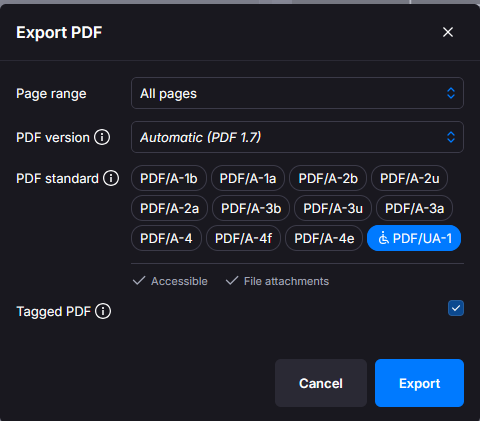
  1. Click Export PDF

  2. Then tick PDF/UA-1 and click Export

Typst CLI

If you are using Typst CLI, are you using the --pdf-standard switch as:

> typst c --pdf-standard ua-1 my_file.typ
Tinymist

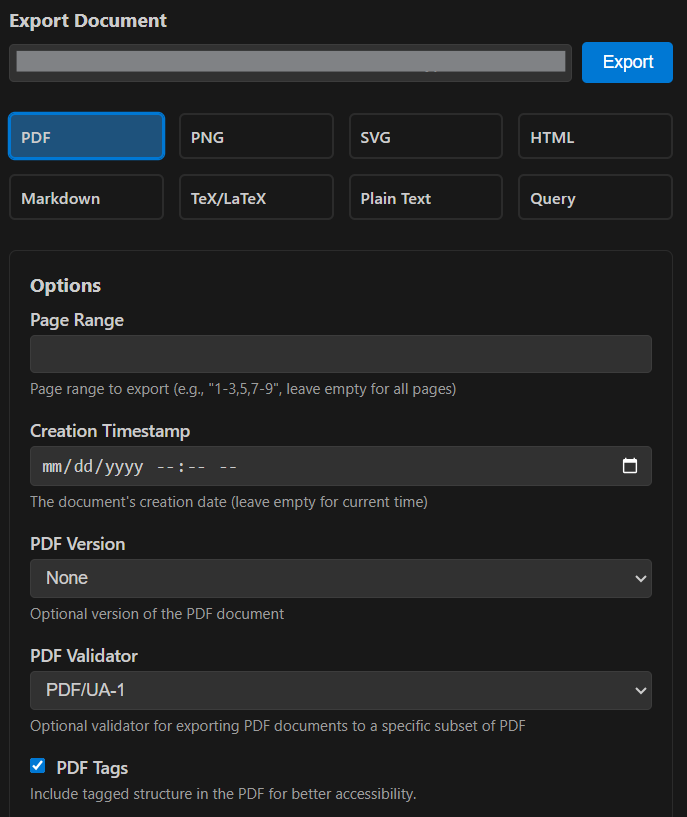
In Tinymist, are you selecting PDF/UA-1 (this time, the field is called PDF Validator instead of standard)?

You need to ensure you have selected PDF/UA-1 as the PDF Standard. Otherwise the validation will fail as PAC will not validate the other formats generated by Typst (AFAIK).

I am asking because I can successfully validate a simple document using the latest PAC-2026. Try it: Typst

Brilliant, thanks!

I compile using the command line. Adding your suggestion --pdf-standard ua-1 works perfectly.

The entire real doc (with 2000+ images) is now seen by PAC-2026 as 100% PDF/UA compatible.

I’d imagined I was years away from accessible PDFs (or at least ones that fully pass accessibility checks). Typst is remarkable!

5 Likes

Glad it worked and that in the end it was as easy as that! Could you please mark this question as resolved by :white_check_mark: ticking the post you found the most useful? Enjoy Typst :slight_smile:
1 Like