When giving code that you want debugged, please include everything needed to reproduce your problem. In this case the page function is not finished and I don’t have access to the same fonts that you do. Also, the Typst code you paste is in code mode (as opposed to content mode). When you do that use ```typc.
Centering vertically is done with horizon.
page( // define layout positions and distances
  align(left+top)[

    #place(
      top + left,
      clearance: 28pt,
      scope: "parent",
      float: true,
      grid(
          columns: (2fr, 1fr),
          rows: (0.5cm, 20pt, auto),
          align: (left, right),
          [],[], //hidden row for space to header
          [#text(font: "Riforma Mono LL", size: 8pt, weight: "bold")[Secondary Info Text]],
          [],
          [#text(font: "Riforma Mono LL", size: 30pt)[#title]],
          [#align(center + horizon, [#text(font: "Riforma Mono LL", size: 10pt, weight: "light")[#box(height: 30pt, radius: 30pt, stroke: 0.5pt + black)[Info Text here]]])]
      )
    )
  ]
)
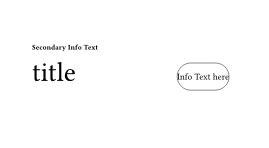
The
inset or outset parameters of box() may be useful to you for giving a bit of space between the box stroke and the text.