Currently, I think you must manually titlecase the heading for Document Outline to be correct. But that defeats the whole point of current/whatever automation. If that’s the case, is there an existing issue for this or how can I create one. Show rules are different from set document(title: [whatever]), I think, so I’m not sure how is it even possible to get the correct casing to be included in the Document Outline. Well, technically it’s probably possible, since the document itself includes the correct version. It’s just a problem of how this final version can be used in the Document Outline.
But at that point, numbering should also just work, even with context. So probably not much reason to separate them.
The whole point is to remove unnecessary manual labor and automate as much as possible, making a document as perfect as possible. This would defeat the purpose (and kind of use of Typst). What are the alternatives?
Why exactly? The one and only concern is that it might interfere with AT, but I don’t see a single mention of none in Accessibility – Typst Documentation. I guess wrapping it in pdf.artifact should seal the deal? But since it’s none, will it actually do anything?
#let titlecase-only-name = it => {
  let limit = 4
  show regex(".{" + str(limit) + ",}"): it => {
    if it.text.match(regex("^[IVXLCDM]\\.[a-z]\\)$")) != none { return it }
    string-to-titlecase(it.text)
  }
  it
}

// #show heading: titlecase
#show heading: titlecase-only-name
#set heading(numbering: "I.a)")
The solution was not what entirely what I expected. Recreating headings without Replacing show rules · Issue #7165 · typst/typst · GitHub would probably introduce a lot of issues because of the duplication. But this is more sane, because the document is basically untouched, however the invisible duplicates are still created, but only for the outline. Moreover, the show rule is not destructive, so you can stack it with other show rules however you like.
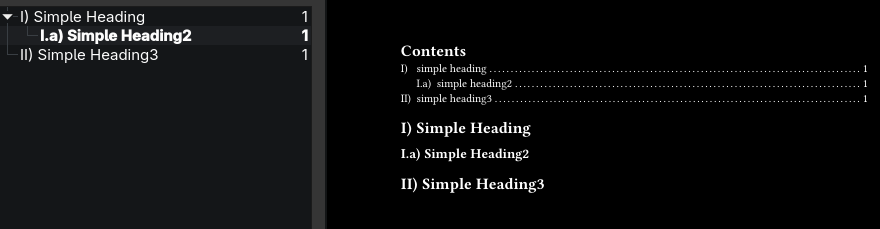
However, the biggest flaw is the discrimination point. We want to have numbering, and better to automate it. But numbering is none to be able to break out of the inception. Thankfully, heading has a ton of fields and for the purpose of text-only outline, you can use almost all of them instead of numbering. And the problem here is that with automating numbering comes automation of a counter, so you either fix/reimplement numbering + spacing, or fix/unstep the counter. Apart from just feeling wrong, the reimplementation of numbering + space is probably affecting the AT, though…maybe not, since it’s probably all text anyway (in the outline). Anyway, I chose to combat auto counter step with a simple unstep, and here is the result:
#set heading(bookmarked: false)
#show heading.where(outlined: true): it => {
  if it.hanging-indent == 1pt * float.inf { return it }
  let (body, ..settings) = it.fields()
  let _ = settings.remove("label", default: none)
  it
  show heading: none
  counter(heading).update(unstep)
  heading(
    ..settings,
    outlined: false,
    bookmarked: true,
    hanging-indent: 1pt * float.inf,
    modify-heading-name(get-text(body)),
  )
}
Full example:
#import "@preview/titleize:0.1.1": string-to-titlecase, titlecase


// Opposite of counter.step. Use as `counter.update(unstep)`.
#let unstep(..n) = {
  let (..rest, last) = n.pos()
  (..rest, calc.max(0, last - 1))
}

#let modify-heading-name = string-to-titlecase // Anything else.
#let get-text = it => it.text // Use t4t package or something better.

#set heading(bookmarked: false)
#show heading.where(outlined: true): it => {
  if it.hanging-indent == 1pt * float.inf { return it }
  let (body, ..settings) = it.fields()
  let _ = settings.remove("label", default: none)
  it
  show heading: none
  counter(heading).update(unstep)
  heading(
    ..settings,
    outlined: false,
    bookmarked: true,
    hanging-indent: 1pt * float.inf,
    modify-heading-name(get-text(body)),
  )
}

#let titlecase-only-name = it => {
  let limit = 4
  show regex(".{" + str(limit) + ",}"): it => {
    if it.text.match(regex("^[IVXLCDM]\\.[a-z]\\)$")) != none { return it }
    string-to-titlecase(it.text)
  }
  it
}

#show heading: titlecase-only-name
#set heading(numbering: "I.a)")

#outline()

= simple heading

== simple heading2

= simple heading3
Your example showed “Contents” in the outline, which is not the default behavior, hence the show heading.where(outlined: true).
The in-document outline can be additionally fixed with something like this:
#show outline.entry: it => {
  if it.element.func() != heading { return it }
  show: titlecase-only-name
  it
}
The only side effect that is present is any kind of query(heading) is affected by this and the duplicates can break something. But I think heading.where(outlined: true) or similar should fix that.
Overall, I like the semi-hacky idea, because it’s actually robust (with invisible side effects), but it’s still undeniably hacky and advanced, Typst must have something user-friendly and native-like.
I think this is hacky because there are a lot of things one has to keep in mind, and at least I wasn’t able to think it fully through. From your text I understand you also thought about possible edge cases and identified at least one, AT I didn’t think of.
I personally prefer to keep things simple as then they are less likely to break when I need them, e.g., in the middle of writing before a deadline. That’s probably just a matter of differences in approach .
I also tried a couple ATs, but it looks like it does not affect the screen readers, though I have no idea if it affects the navigation of the document structure.


 .
.