How to create a terminal style for code block

I am working on a tutorial for my students that looks like:

- Open your terminal (Command Prompt, PowerShell, or Git Bash on Windows; Terminal on macOS/Linux).
  - Navigate to the directory where you want to store your project using the `cd` command. For example:
    ```bash
    cd path/to/your/directory
    ```
  - Once you are in the right directory, *clone* the repository by copying the `HTTPS` in to the top right of your GitHub repository page, and running the following command:
    ```bash
    git clone <PASTE_URL_HERE> 
    ```

For the code blocks, I would like to a “terminal” style with potentially a prompt. Does a package like that exist or can simple styling get the job done?
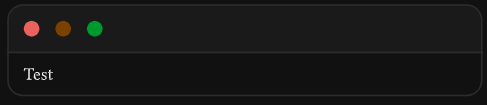
My current block looks like:

#show raw.where(block: true): block.with(fill: luma(240), inset: 1em, radius: 0.5em, width: 100%)

Hi there @kfold3 ,

I haven’t tried it but you could try something like:

Could you please edit the title of your post to ensure it is in line with our guidelines:

Thanks, edited. The basic term.typ script does the job for me, however it’s a bit cumbersome. I have to write

    #term(
      content: [`$  cd path/to/your/directory/cs496/`],
    )

but it would be easier if I just type

    #term[`$  cd path/to/your/directory/cs496/`]

The function definition is

#let term(
  content: [],
) = {
  return align(
    left, 
    box(
      width: 300pt,
      stack(
        dir: ttb,
        align(left, toolbar()),
        main(
          content: content,
        ),
      )
    )
  )
}

is there a way I can modify the function to just use square brackets?

Yes, try

#let term(
  content, //--> Remove `: []` (the default value)
) = {
  return align(
    left, 
    box(
      width: 300pt,
      stack(
        dir: ttb,
        align(left, toolbar()),
        main(
          content: content,
        ),
      )
    )
  )
}


#term[Test]