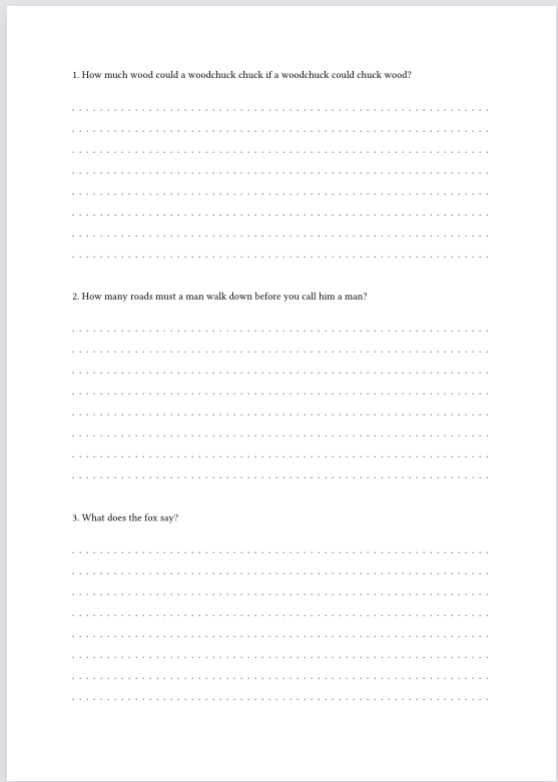
If I’m making an exam, and I want three questions on the page, each with dotted lines beneath for the answers, I might do something like this:
+ How much wood could a woodchuck chuck if a woodchuck could chuck wood?
    #block(
  width: 100%,
  height: 1fr,
  fill: tiling(size: (8pt, 8mm))[.],
)

+ How many roads must a man walk down before you call him a man?

    #block(
  width: 100%,
  height: 1fr,
  fill: tiling(size: (8pt, 8mm))[.],
)

+ What does the fox say?

    #block(
  width: 100%,
  height: 1fr,
  fill: tiling(size: (8pt, 8mm))[.],
)
But what happens is that the first tiling block fills the entire page, and the second tiling block fills another page, etc. Is there a way to distribute vertical space evenly with 1fr or another similar device, so I don’t have to fiddle with absolute lengths?
I did find this post, which seems to be about a similar issue, but it only applies to grids.
This question is about a limitation (as it seems right now) of the 1fr length in this case, which is that it can ONLY fill up the remainder of the page. So whereas in LaTeX you could have several blocks of length \stretch{1}, each taking up an equal amount of space, when I try to use the same principle with 1fr I can only have one block of dotted lines on the page.
Ideally, this would be modified to allow different height values depending on the expected length of the answers. And allow for some validation, etc.
Full Solution
// https://forum.typst.app/t/how-to-arrange-a-numbered-item-list-into-two-columns/3525/4?u=vmartel08
#show grid: it => {
let counter = counter("resume-enum-numbering")
counter.update(1)
show enum.item: item => context {
let num = counter.display(enum.numbering)
counter.step()
[#num #item.body]
linebreak()
}
it
counter.update(1) // reset
}
#let qs = (
[+ How much wood could a woodchuck chuck if a woodchuck could chuck wood?],
[+ How many roads must a man walk down before you call him a man?],
[+ What does the fox say?],
)
#let questions(args) = grid(
  columns: 1fr,
  row-gutter: 2em,
  rows: (1.2em, 1fr) * args.len(),
  fill: (_, y) => if calc.odd(y) { tiling(size: (8pt, 8mm))[.] },
  ..args.intersperse([ ]),
)
#questions(qs)
This is caused by block(height: 1fr) being specifically used in a list, and indented that way. Actually behaves correctly, so doesn’t take up the entire page each time, when indentation in front of block is removed, however that also resets the numbering. Indeed, this probably is a current limitation.
I would recommend doing one of the following:
Don’t use the + syntax, but instead enum explicitly or a custom function, for example those from the previous post:
Probably not the most desirable solution to this post?
Use scoped show rules for enum:
I have tried several rules while preserving the use of
+ X
  #block(height: 1fr)
+ Y
  #block(height: 1fr)
+ Z
  #block(height: 1fr)
syntax, or even simply
+ X
+ Y
+ Z
but what happens is that either the item numbering resets or the dotted region’s indentation is wrong.
Not that this would help much anyway, but trying enum(spacing: 1fr) is at the moment invalid.
We could probably reach a reasonable solution through means other than block, like layout or measure, depending on how much you would be willing to complicate the matter. I would rather wait at this point to see whether someone can think of an easier way.
I already see a reply from @vmartel08 above now. That’s quite a unique approach which would fall under my first recommendation. I imagine my second recommendation, where Typst’s exact list syntax is to be used, would probably prove to be even more difficult.
To elaborate on this, a (somewhat) straightforward implementation of a custom function could look like this:
// Function implementation
#let dot-enum(..elements) = {
  for (index, item) in elements.pos().enumerate() {
    // Fix incorrect numbering
    enum(start: index + 1, item)
    // Tiling block
    block(
      width: 100%,
      height: 1fr,
      fill: tiling(size: (8pt, 8mm))[.],
    )
  }
}

// Usage
#dot-enum[
  How much wood could a woodchuck chuck if a woodchuck could chuck wood?
][
  How many roads must a man walk down before you call him a man?
][
  What does the fox say?
]
Which gives a similar output as @vmartel08’s solution without making use of grids.