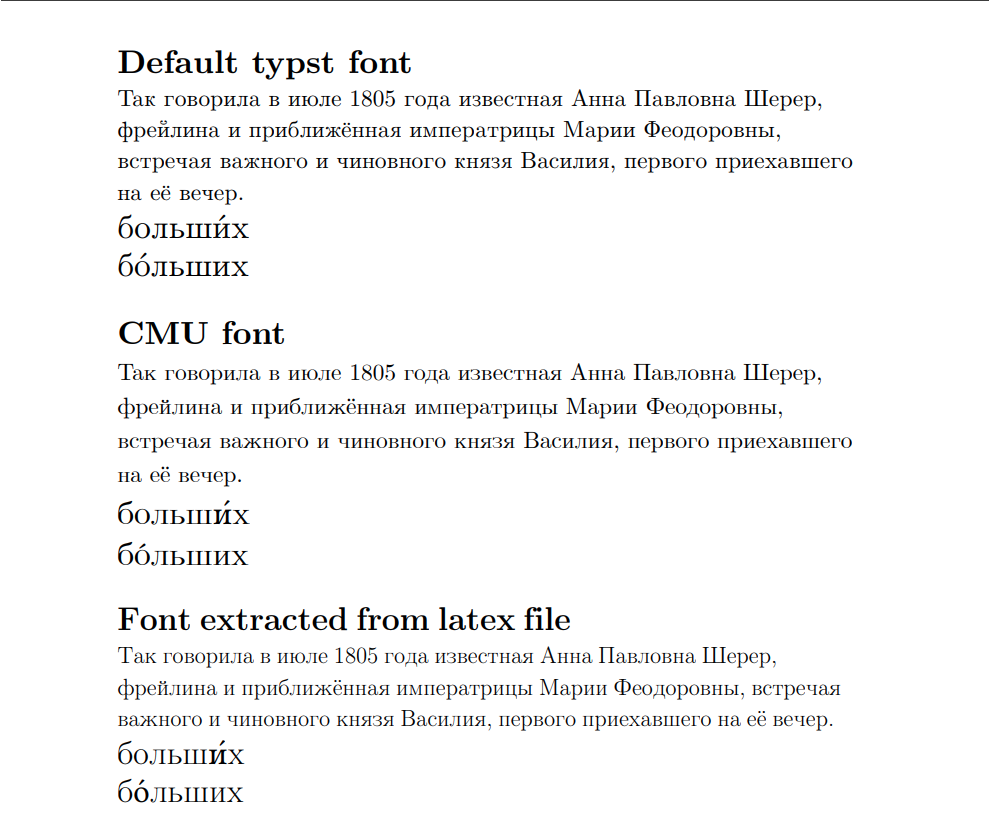
I mainly use cyrillic script. for the cyrillic text font in latex i mostly use this setup:
\documentclass[14pt]{extarticle}
\usepackage[T2A]{fontenc}
\usepackage[russian]{babel}
but typst’s default New Computer Modern looks very different (see the picture). then I was trying to find it on the internet. The one that fits the most is CMU (some kind of Computer Modern as I know) but it still doesn’t support weight 400 which is default for latex (see the letters in the second example are thicker than in the third). Then I tried mutool to extract the font from a compiled latex pdf with a symbol table built by
\usepackage{fonttable}
\fonttable{\fontname\font}
which worked quite well except it had two problems:
- If small capital font variant is added to the document files, it applies instead of regular font. I fixed it by assigning small capital a different font family and using a show rule for small caps, but maybe there’s a better solution.
- Letters that have diacritics don’t work (see the last example with stresses on words) because latex stores the base symbol and attached diacritic mark separately in the font file.
All custom font files are .otf. Is there a proper way to make the font look the same in all cases?