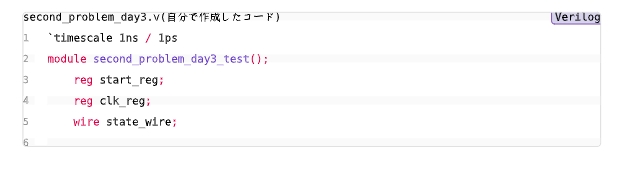
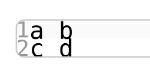
I am using Typst to create code blocks, but I’m having trouble narrowing the vertical space between lines. Even after trying several layout settings, the line spacing remains quite large—almost as tall as the characters themselves.
Below is the relevant part of my code and the image of the code block I wrote. Could anyone point out what I might be missing or how to properly reduce the line spacing?
#import "@preview/codly:1.3.0": *
#import "@preview/codly-languages:0.1.1": *

#show: codly-init.with()

#codly(

  languages: codly-languages,

  number-format: n => text(fill: luma(150), size: 0.9em)[#n],

  zebra-fill: luma(250),
  stroke: 0.5pt + luma(200),
  radius: 3pt,

  smart-indent: true,
  inset: 0em,
  breakable: true
)
#show raw: it => {
  set text(size: 8.5pt)

  set par(leading: 0em)

  it
}
the result: