Basically, how do I get this functionality?
#numbering("1.", 1, 2, 3)<foo>

As can be seen in @foo[hello]    // ERROR: Cannot reference text
Basically, how do I get this functionality?
#numbering("1.", 1, 2, 3)<foo>
As can be seen in @foo[hello] // ERROR: Cannot reference text
Hello @Astrid,
Could you please provide a bit more insight into what you are trying to achieve? Perhaps provide an example, with the desired result?
The code snippet you have provided won’t work as you are trying to reference a string. Try:
#type(numbering("1.", 1, 2, 3)) //--> str type
The documentation mentions:
the label must be attached to a referenceable element . Referenceable elements include headings, figures, equations, and footnotes.
…
If you just want to link to a labelled element and not get an automatic textual reference, consider using thelinkfunction instead.
Please provide a bit more insight into what you are trying to achieve?
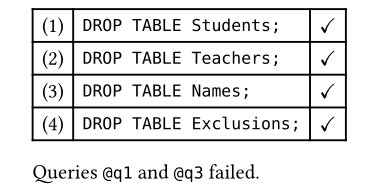
In that case, my question is about how to create a new type of referenceable element. This is a use-case that has popped up several times. The most recent two was referencing “rules” that were enumerated in prose, and “queries” in a table. Something akin to:
// Does not work! Parts have been `quoted` to avoid error
#lorem(3) Rule #numbering("A.1", 1, 1)<foo> #lorem(5)
#lorem(3) Rule #numbering("A.1", 1, 2)<bar> #lorem(5)

#lorem(3) Rule #numbering("A.1", 2, 1)<baz> #lorem(5)

This is `@foo[Rule]`, `@bar[Rule]` and finally `@baz[Rule]`.
// Does not work! Parts have been `quoted` to avoid error
#table(columns: 3,
  [#numbering("(1)", 1)<q1>], [`DROP TABLE Students;`], [$checkmark$],
  [#numbering("(1)", 2)<q2>], [`DROP TABLE Teachers;`], [$checkmark$],
  [#numbering("(1)", 3)<q3>], [`DROP TABLE Names;`], [$checkmark$],
  [#numbering("(1)", 4)<q4>], [`DROP TABLE Exclusions;`], [$checkmark$],
)

Queries `@q1` and `@q3` failed.
You want to create a custom referenceable element.
To create a custom referenceable element like a theorem, you can create a figure of a custom
kindand write a show rule for it. In the future, there might be a more direct way to define a custom referenceable element.
Something like