Hello,
I noticed that when a capture follows a table, figure, link or a code snippet, the space is larger between those elements, in comparison to a caption following a text. Why is that and how can the “extra space” be removed?
Thanks and kind regards
Do you have any code that can produce an example? I must be misunderstanding the problem, because the vertical spacing following these two figure types is the same:
#set align(center + bottom)

#let text-fig = box[
  #figure(
    [text figure],
    caption: [caption]
  )
  Following Text
]

#let table-fig = {
  set text(red)
  box[
    #figure(
    table([table figure]),
    caption: [caption]
    )
    Following Text
  ]
}

#grid(
  columns: 2,
  column-gutter: -6.7em,//Overlap them to make differences more obvious
  table-fig,
  text-fig,
)
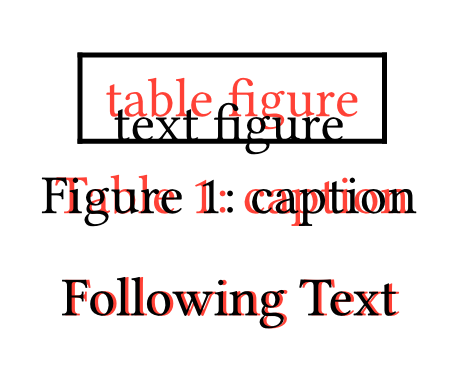
Hi. You can modify figure.gap. The other space is par.spacing.
#set par(spacing: 0pt)
#set figure(gap: 2em)
#figure(table[], caption: [Caption])
#lorem(50)

this is the only thing I changed for the heading:
#show heading: it => {
  if it.level == 1 { pagebreak() }
  //if it.level == 1 { pagebreak()  + v(30pt)}
  //if it.numbering != none { h(0.5em) + linebreak()}
  if it.numbering != none { linebreak() + v(15pt) +counter(heading).display() }
  if it.numbering != none { h(0.5em) }
  it.body
  v(if it.level == 1 { 5pt } else { 1pt })
} ```Use backticks when giving code snippets, as described in How to post in the Questions category.
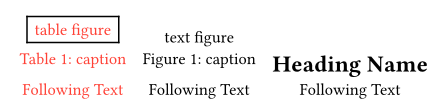
Almost. It’s the spacing between the text and a following heading and a figure caption and a following heading. Those are not the same and I don’t understand why. If I change the v(15pt) to less then 15 then the space between figure caption and heading is too little (same spacing for ever value less then 15…) between text and heading and figure caption and heading. It seems I need a specific rule for only the figure caption heading relation?
So you want them to be the same which is the default but does not have the spacing that you want.
If you add a weak vertical space before you place anything inside the show rule, this will collapse the space added by the block that the figure has below it:
#show heading: it => {
  if it.level == 1 { pagebreak() }
  //if it.level == 1 { pagebreak()  + v(30pt)}
  //if it.numbering != none { h(0.5em) + linebreak()}
  v(0pt, weak: true)
  if it.numbering != none { linebreak() + v(15pt) +counter(heading).display() }
  if it.numbering != none { h(0.5em) }
  it.body
  v(if it.level == 1 { 5pt } else { 1pt })
}
If you set all block elements to have a stroke (#set block(stroke: 1pt)), this is what it shows:
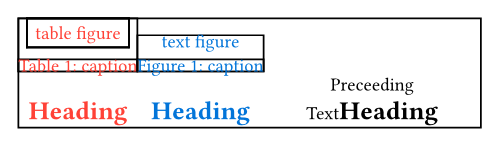
That’s how I noticed a difference and thought to collapse the space