I want to remove all second-level headings that contain “foo” from the compiled output - as if those lines were commented out or never existed.
I understand how to style headings with #show rules, but I don’t understand how to:
Remove/exclude content entirely (not just style it)
Filter headings by both their level AND their body content
Said in another way, the extent of my knowledge is styling text but I don’t know how to style only headings that match my regex; and I don’t know how to make text not display. (This is different from hiding. I want the pdf compiled as if my matched header was commented out.)
// What I know
#show heading.where(level: 2): set text(red)
#show regex("foo"): set text(blue)

// Example of what I have
== Something
== foo
== Something else

//Desired output
== Something
== Something else

// The `== foo` heading should not appear at all in the compiled document and the rest of the content should move up to fill the space.
While it may look like show rules operate on the raw source text of your document, they do not. Show rules only kick in after Typst has parsed the document. In other words, the headings are there and will not go away. You might be able to hide them, and I’m sure people will help you with that, but it will be very hard to delete the headings from within Typst.
A reminder when posting in the Questions category: the title of the post must be a question, which you would pose your friends or colleagues (see How to post in the Questions category). So for the future set it accordingly. I unfortunately don’t have enough permissions to change your title.
Additionally use the code blocks syntax when posting code, as it’s easier to read typst code/script when syntax highlighting is shown:
```typst
// your code here
```
Now to your question:
This is not possible. Show rules are applied, after the content has been placed. This means even if you can hide the heading somehow, “foo” exists in the documents outline and location!
There are options to use command line arguments and the sys module:
// since inputs are always string, we have to use a comparison
// (or `eval()`) to get a boolean (I think, am not the best Typst programmer...)
#let show-foo = sys.inputs.at("show-foo", default: "true") == "true"

== Something

#if show-foo [
== foo
]

== Something else
In this case you would call typst compile /path/to/doc.typ --inputs show-foo=false to not show the foo headers.
Although I’m not exactly why you would want to do that. What kind of document do you want to create?
Thank you. For collaboration reasons, == foo is in the text, but for pdf and html, we do not want it. That is why sed woudn’t work. But I supposed that we could comment them out. (We are considering migrating *.md files to *.typ and I am studying what would be involved.)
Thank you for the useful link on how to ask questions and how to mark the typst code so that it shows up. I have made the edits in the original post.
I’m considering migrating several books that are in *.md files that we have scheduled to be typeset via LaTeX. There are some ## section headings that are there for reference and navigation purposes in the markdown that are not meant for production. In the LaTeX pipeline, these are stripped out in pre-processing. But since I am considering migrating to .typ, we wouldn’t have the same pre-processing pipeline. This is a real world example, although I can think of … (er) other-worldly examples examples that are not currently in my use case.
Thank you! I think this is what I am looking for. I don’t know how to works , but I will play with it. What would I look for in the documentation that would help me understand the code you posted?
Thank you again for the helpful code to get me started. Obviously I don’t know what I am doing. I can’t even seem to get the and logic working.
#let foo-show = true

#let foo-in-subheading(level: 2, content) = {
  if foo-show {
    heading(level) and content == regex("foo")
    content
  }
}

= Something

// What the current code is and what I would like it to remain if possible.
== foo

// What is necessary (so far) in the current approach to toggle `== foo` on and off.
#foo-in-subheading[== foo][]
#let show-foo = true

#let foo(content) = {
  if show-foo {
    content
  }
}

= Something

#foo[
  == Some reference which can be hidden or not
]
#let show-foo = true
The first line declares a variable named show-foo with the value true assigned. This variable is used to show/hide the reference/navigation elements.
#let foo(content) = {
  if show-foo {
    content
  }
}
Then a function called foo with 1 parameter is created. content is where you would put the foo.
The position of level: ... is not important, BUT the first “unnamed” parameter will always be title and the second one content.
= Something

#foo[
  == Some reference which can be hidden or not
]
Now if you want to hide all foo() just change the value of show-foo to false
In regards to your changes
#let foo-in-subheading(level: 2, content) = {
  if foo-show {
    heading(level) and content == regex("foo")
    content
  }
}
You don’t need and content == regex("foo") at all. If you set show-foo to false, all the elements which are created/rendered through #foo will not be rendered.
The example can also be visually solved by direct comparison:
#import "@preview/t4t:0.4.3": get
#show heading: it => if get.text(it.body).match(regex("fo{2,}")) == none { it }
#show heading.where(body: [foo]): none

== Heading
== foo
But it will not affect the PDF Document Outline. Similar to show table: it => block[text], show rules cannot fully remove original elements either from context/compilation or from output. It is something that could be possible, so the above example can work more than just visually.
Saving the pdf and opening the outline pain, I don’t see the hidden element in the outline. So I think this is the solution except the part of how to use a regex. The documentation seems sparse in this area. I can see the syntax for the actual regex, but not how to attach a regex into the current function
So, given your code we have
#show heading.where(body: [foo]): set heading(outlined: false)
#show heading.where(body: [foo]): none
And using my pseudocode, I want
#show heading.where(body: [regex("foo"]): set heading(outlined: false)
#show heading.where(body: [regex("foo"]): none
You unfortunately can’t use a regex in the same way. That’s where you end up without a good solution (or into the solutions with replacing/hiding an existing element). You should be able to match using more complex content than just [foo] but it needs to be literally the same, not by pattern.
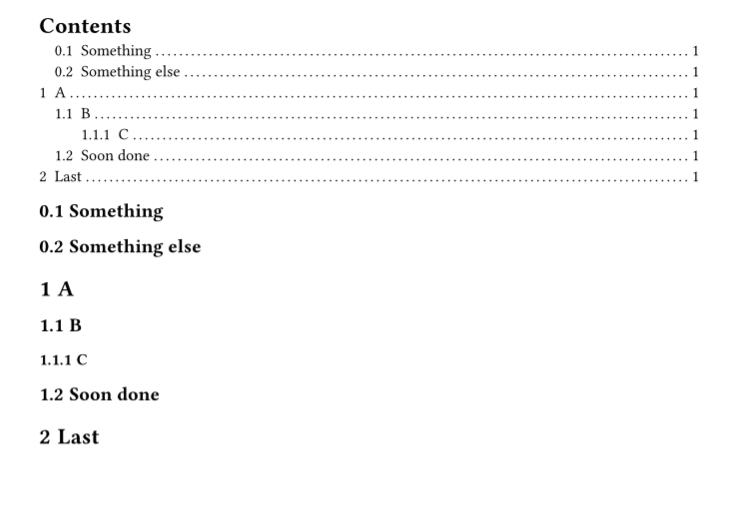
Here’s a way to match with regex and hide the matching headings. In this case it’s using a regex match on the t4t.get.text result which I think is probably the best way to do it - much easier than using the native show regex(..) kind of matching - both methods have their drawbacks too.
#import "@preview/t4t:0.4.3"

#show: doc => context {
  // find matching headings
  let matching-headings = query(heading).filter(elt => regex("foo") in t4t.get.text(elt.body))
  let heading-fields = matching-headings.map(elt => (level: elt.level, body: elt.body))
  // get a selector for those headings
  let heading-selector = <_matches_nothing>
  if heading-fields.len() > 0 {
    heading-selector = selector.or(..heading-fields.map(f => heading.where(..f)))
  }
  // hide them - and exclude them from outline and numbering
  show heading-selector: none
  show heading-selector: set heading(outlined: false, numbering: none)
  doc
}

#set heading(numbering: "1.1")
#outline()
== Something
== foo
== Something else
= A
== B
=== C
= foo
== foobar
== footerism
== Soon done
= Last
Here is a hacky way to do it, but the warning above applies: we end up with un-typsty solutions that have drawbacks and don’t compose at all with other functionality (templates, packages).
We can’t replace a heading element truly. Good solutions use show-set to change an existing heading’s presentation. But here I think we need to replace the heading and “forget about the old one” to properly make it work with the outline as well.
To do this it’s essentially doing
Make headings unoutlined and unnumbered by default. (So that we can forget about headings we don’t want)
Check if the heading body matches the regex
If so, convert it to a new heading that is outlined and numbered.
Below I’ve checked that this works out with numbering and outlining in total. However it is known that it breaks at least these features:
Heading labelling and referencing
(more to come)
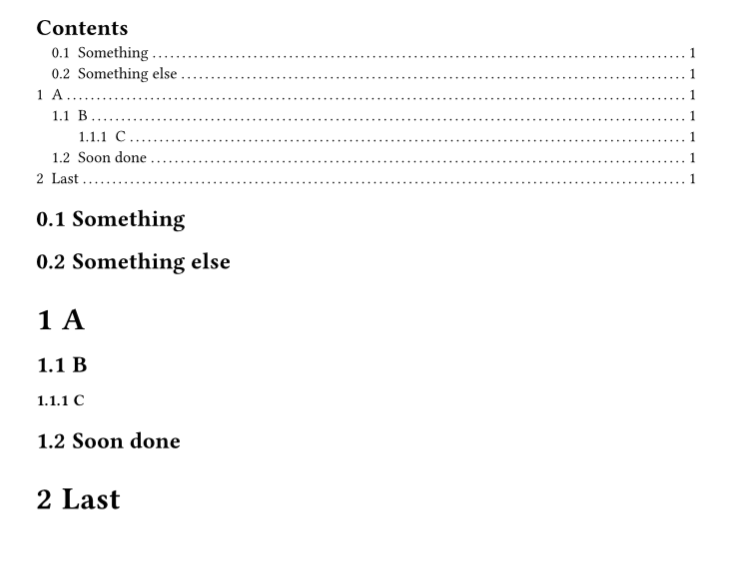
Code and output
// Use heading.outlined = false/true as a marker
// and this makes sure that the extra headings we create are not displayed
// Some severe drawbacks of this: headings must be non-numbered and non-outlined
// by default. Because the original headings will be "abandoned and hidden", not removed.

// required defaults
#set heading(outlined: false, numbering: none)
// then the rest will be numbered and outlined.
#let numbering = "1.1"
#let outlined-exceptions = ([Contents], [Bibliography])

#show heading: head => {
  // First: early return if already good
  if head.outlined or outlined-exceptions.contains(head.body) {
    return head
  }
  let matches-pattern = state("matches-pattern")
  {
    // HACK: Place hidden copy of the heading title to test it vs the regex
    matches-pattern.update(false)
    show regex("foo"): it => it + matches-pattern.update(true)
    place(hide(head.body))
  }
  context {
    if matches-pattern.get() {
      // forget about this heading
    } else {
      let (..fields, body) = head.fields()
      heading(..fields, outlined: true, numbering: numbering, body)
    }
  }
}


#outline()
== Something
== foobar
== Something else
= A
== B
=== C
= foo
== foobar
== footerism
== Soon done
= Last
This is neat. Thank you. Real Life deadlines have the next couple of days packed, but I will be studying this. To show my newbieness, query and .filter are new things to me.
 , but I will play with it. What would I look for in the documentation that would help me understand the code you posted?