Hello,
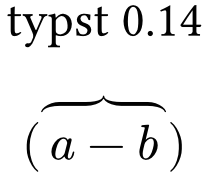
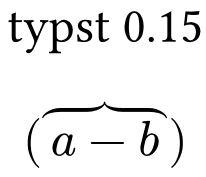
I recently updated from 0.14 to 0.15 and the
- Improved layout of under/over elements like
underbrace
Release notes
changed how my overbraces look. e.g.
#set text(size: 25pt)

#align(center)[typst 0.15]
$
  \( overbrace(a - b) \)
$
Is there a way to return it to how it looked before in 0.14? I actually liked that there was an additional space between the brace and the text and I also have a 300 pages document which I rather not look through and fix everything manually.
Hello @ToppDev,
For future posts in the questions category, don’t forget to pose the title like a question you’d ask your friend (How to post in the Questions category). This makes searching a bit easier.
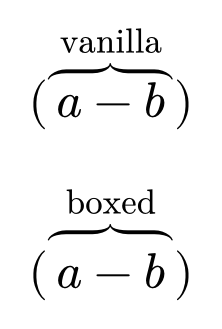
A possible solution would be to encapsulate the a - b in a box and set the top inset to a desired value. This offsets the brace upwards.
#set page(width: auto, height: auto, margin: 5mm)
#set text(size: 25pt)

$
  \( overbrace(a - b,"vanilla") \)\
$

#let overbrace(body, upper) = {
  math.overbrace(box($ body $, inset: (top: 0.2em)),upper)
}

$
  \( overbrace(a - b,"boxed") \)\
$
thanks, that is perfect.
However, for my example to work it needs to have a argument sink as the second parameter, so it can accept 0 or 1 argument. But in a real document you would not use it without a text above.
#let overbrace(body, ..upper) = {
  math.overbrace(box($ body $, inset: (top: 0.2em)), upper.at(0, default: none))
}
I keep forgetting about argument sinks, haha!