Can you please edit the title of your post to be a question (see here):
The title of your question should make clear what your post is about. Good titles are questions you would ask your friend about Typst.
Also, if you look again at the way your post renders you’ll see that #outline turned into something else. Please use backticks (`#outline`) for inline code and triple backticks (``` multi-line code```) for proper formatting. This is covered here.
Finally, to your question.
Is it correct that you want this outline to show all chapters (level 1 headings)? And the way you want them displayed is to include their start and end pages?
Reading your question a couple more times these points seem obvious, but my first time through I thought you were asking for something else so I wanted to clarify.
To add to housekeeping things, it is not clear to me what the intended behavior is, namely how the last page should be determined. Are you okay with adding some kind of marker manually at the end of each chapter, or should the last page be detected automatically?
If it should be automatic, how should this behave if there are multiple blank pages at the end of a chapter, should it include the last page non-blank or the last blank page? Can the chapters have supplementary content after the last page, but before the start of the next chapter (like images, exercises, etc)?
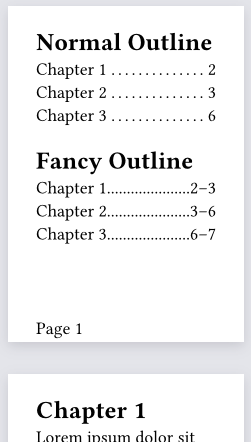
Here’s a show rule that rebuilds each outline.entry, looks up the page of the chapter and the next chapter and displays it as you’ve demonstrated. If there is no next chapter the final page of the document is used.
Some limitations or other notes:
The last chapter only works if the chapter ends on the final page of the document - no appendices or blank pages
The styling of the rebuilt outline entries is not the same as the standard ones
Rebuilding things like this makes them less composable
edit: There is no link to the chapter - clicking in the outline does nothing
#set page(
  "a8",
  footer: context [Page #counter(page).display("1")]
)

#outline(title: [Normal Outline])

#show outline.entry: it => {
  let entry-text = it.body()
  let ch = query(heading.where(body: entry-text)).first()
  let start-page = ch.location().page()
  let next-chapter = query(
    heading.where(level: 1).after(
      heading.where(body: entry-text),
      inclusive: false
    )
  )
  let end-page = if next-chapter.len() == 0 {
    //No next chapter, assume it ends on the last page
    counter(page).final().first()
  } else {
    next-chapter.first().location().page()
  }

  grid(
    columns: (auto, 1fr, auto),
    entry-text,
    repeat("."),
    [#start-page#{if end-page == none [] else [#sym.dash#end-page]}]
  )
}
#outline(title: [Fancy Outline])

= Chapter 1
#lorem(50)

= Chapter 2
#lorem(75)

= Chapter 3
#lorem(50)
The problem pointed out in the thread already is that Typst doesn’t have a section object, so there is no built-in way to tell where a chapter ends, only where one begins (presumably at its heading). The difference is clear when there is a pagebreak after the end of a chapter and the beginning of a new one - this is when you need a marker for each section or chapter end.
One way to think about this, is that you need to add the missing information to your typst document. In this case it might be: defining a custom #section[] function that inserts a marker at the end of its content. Then you use the custom function in your document so that you have all the information you need available for building your custom outline.
Without this extra information explicitly - there might be ways how to find this information automatically and implicitly from paragraph and figure positions. Which solution works best depends a bit on how you want to write the document.
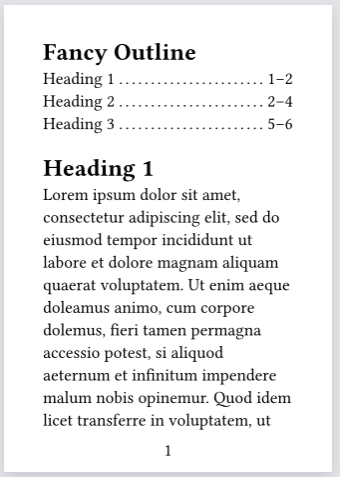
This is my simplified (is it simplified?) version of yours, which I still hope is helpful or instructive - we can place metadata markers and use their location directly.
#set page(paper: "a7", numbering: "1")
#show outline.entry: it => {
  let end-marker = query(selector(<chpend>).after(it.element.location())).first()
  /// format page number for page at the given location
  let getpage(loc) = {
    numbering(loc.page-numbering(), ..counter(page).at(loc))
  }
  link(
    it.element.location(),
    it.indented(it.prefix(), {
      it.body()
      h(0.25em)
      box(it.fill, width: 1fr)
      h(0.25em)
      getpage(it.element.location())
      sym.dash.en
      getpage(end-marker.location())
    }),
  )
}
#outline(title: "Fancy Outline")
#let chapter-end = [#metadata(none)<chpend>]
= Heading 1
#lorem(100)
#chapter-end


= Heading 2
#lorem(100)
#chapter-end
#pagebreak()

= Heading 3
#lorem(100)
#chapter-end