I am a beginner with Typst, and I am trying to build an entry system like Wikipedia.
First idea is to automatically add a label on each entry’s text, but unfortunately Typst is unable to add labels by script. (See the last sentence of section Syntax in Label Type – Typst Documentation)
So, I tried to remember the position of each entry’s definition. Since Typst doesn’t support global variables, I tried to use a state, then I encountered the problem mentioned in the title.
After resolving all the errors, the simplified core code is like:
#context {
  let st = state("st", ())

  st.update(arr => {
    arr.push(here())
  })

  [#st.final()]
}
(I must put all the code in #context or it will error)
In my idea, this code is expected to add the current position to the array in the state st, but the compiler popped up a warning: layout did not converge within 5 attempts.
How to solve this problem?
Is there any method not to wrap up all the code in a #context?
My English isn’t perfect, so my replies might be a little slow. Thank you for your patience.
Usually, this warning means that we are not using typst in the right way. To reduce waiting time, typst compiles our documents incrementally.
In your case, keeping an array of locations might be straightforward, but not performant during recompilation. Say, if we swap the order of the two items, the entire list will have to be recalculated.
(There’re actually more non-native English speakers than native English speakers. Different researches give different ratios, but the conclusion is definite.)
I didn’t know that before. But after using this feature, wrapping up all codes into a context is no longer needed. It solved all of my two questions at once!
This is what I haven’t considered. But as state is a must, I have no other method to solve it.
I don’t think you must use state. I don’t have the full context of your document and use case, but normally for this, I expect that you can use metadata to place data into specific locations in the document, and you can use query to receive that metadata and create a list/table/result that uses both the data and the locations of the metadata as needed.
It’s quite common that problems are solvable using either state or query. It’s often easier to work with query than state, at least in my opinion. Also IMO, storing the result of here() in state is a sign that query would be better.
Thank you for your reply!
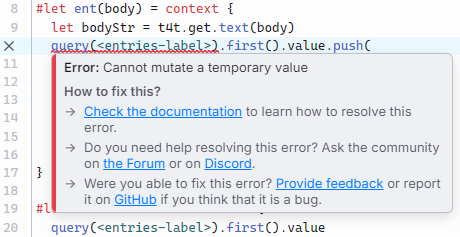
I tried metadata, but it seems like the value got by query cannot be modified by script.
I need to generate the list of entries dynamically (by a function) in the document, so can metadata create the list array without my manual operation?
You can create a new array based on the result you get from query no problem, for example using the array methods map or filter. If there’s something you can’t modify, maybe showing an example where we can reproduce and understand the problem will help us resolve that.
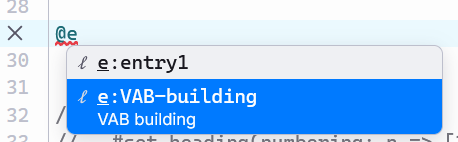
I guess the idea of show entry will be problematic. If I have two entries, VABS and VAB, then they will interfere with each other.
Here’s another approach. It leverages the native ref mechanism.
#import "@preview/t4t:0.4.3": get
#let define-entry(body) = {
  let key = get.text(body).replace(" ", "-")
  body
  [#metadata(body)#label("e:" + key)]
}

// 修改自 https://typst.app/docs/reference/model/ref/#customization
#show ref: it => {
  let el = it.element
  if el != none and str(it.target).starts-with("e:") {
    link(el.location(), el.value)
  } else {
    it
  }
}

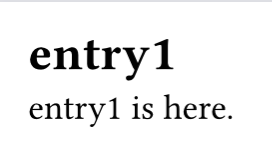
= #define-entry[entry1]

@e:entry1 is here.
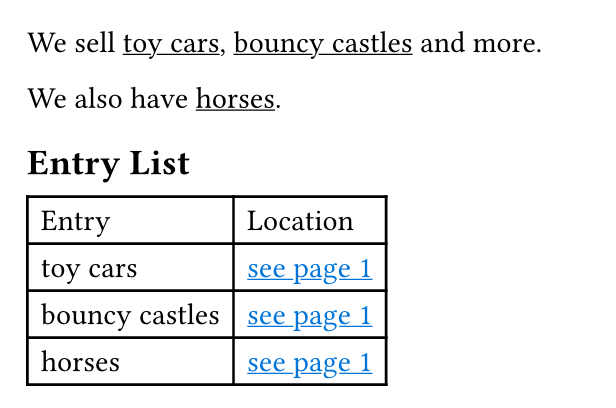
I understand your question about mutability now. The basic model would be like this: ent places content and metadata with a label. No modifications, more than just adding items to the document. When you need to make a list or table, or other operation on all the entries (entEmb) that’s when you use query to get a list of all entries.
Here’s a minimal example that does something a little bit easier:
#let entry(name) = {
  show: underline
  [#metadata((name: name))<_entry>]
  name
}

We sell #entry[toy cars], #entry[bouncy castles] and more.

We also have #entry[horses].

== Entry List

#context {
  let entries = query(<_entry>)

  show link: underline
  show link: set text(blue)
  table(
    columns: 2,
    table.header([Entry], [Location]),
    ..for entry in entries {
      (entry.value.name, link(entry.location(), [see page #entry.location().page()]))
    }.flatten()
  )
}