How can I add a dotted line like bibliography between two texts that are left and right aligned?

Hello,

I’ve been trying a bit the last couple of days, and I didn’t manage to get it to work what I would like to do. I’ve seen How to add horizontal line in between text lines and this is a dumbed down solution of what I have in mind.

In short, mentally thinking, I have a grid with two columns, where the first column is left aligned and the second column is right aligned. So far, so good, and not an issue. But now, I would like te see a dotted line between the texts of the first and second column.

My first thought was: let’s make it a four columns thing, where I’ll add a dotted line that’s aligned to the right for the second column and a dotted line that’s aligned to the left for the third column. Each then gets a 100% - 1.25em or something to leave some space. But this has the issue where they meet in the middle: it’s ugly, not continuing properly and sometimes it looks like the spacing is also off if you try to manually tune it.

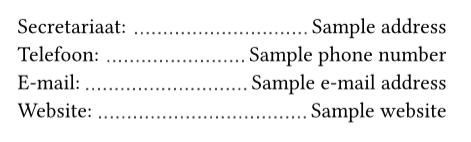
Basically, what I want to achieve is exactly the same as the bibliography does. It shows a left aligned label on the left, then a dotted line, and a right aligned label on the right. As my content isn’t bibliography oriented and I really don’t fancy creating it like that either (unless I may be able to do it inline), I also want to control the total width and a bit more of the styling.


I cooked myself something like this, but it’s genuinely not good enough for my tastes haha. I’m wondering if I simply overlooked something trivial…

#align(right)[
  #box(width: 20em)[
    #grid(columns: (auto, auto), inset: (x: 0mm, y: 0.65em / 2), align: (left, right),
      grid(columns: (auto, 1fr), "Secretariaat:", align(right + bottom)[#line(length: 100% - 0.65em, stroke: (paint: luma(50), dash: "dotted"))]), 
      grid(columns: (1fr, auto), align(left + bottom)[#line(length: 100% - 0.65em, stroke: (paint: luma(50), dash: "dotted"))], "Sample address"),

      grid(columns: (auto, 1fr), "Telefoon:", align(right + bottom)[#line(length: 100% - 0.65em, stroke: (paint: luma(50), dash: "dotted"))]), 
      grid(columns: (1fr, auto), align(left + bottom)[#line(length: 100% - 0.65em, stroke: (paint: luma(50), dash: "dotted"))], "Sample phone number"),

      grid(columns: (auto, 1fr), "E-mail:", align(right + bottom)[#line(length: 100% - 0.65em, stroke: (paint: luma(50), dash: "dotted"))]), 
      grid(columns: (1fr, auto), align(left + bottom)[#line(length: 100% - 0.65em, stroke: (paint: luma(50), dash: "dotted"))], "Sample e-mail address"),

      grid(columns: (auto, 1fr), "Website:", align(right + bottom)[#line(length: 100% - 0.65em, stroke: (paint: luma(50), dash: "dotted"))]), 
      grid(columns: (1fr, auto), align(left + bottom)[#line(length: 100% - 0.65em, stroke: (paint: luma(50), dash: "dotted"))], "Sample website")
    )
  ]
]

This results in the following, where the red rectangle is mine to show a bit where it looks funky. Additionally, this will have some weird spacing behavior as well, because it tries to keep the “left column” as large as possible, causing the “right column” to not have enough space to add the dotted line at the longest piece of text.


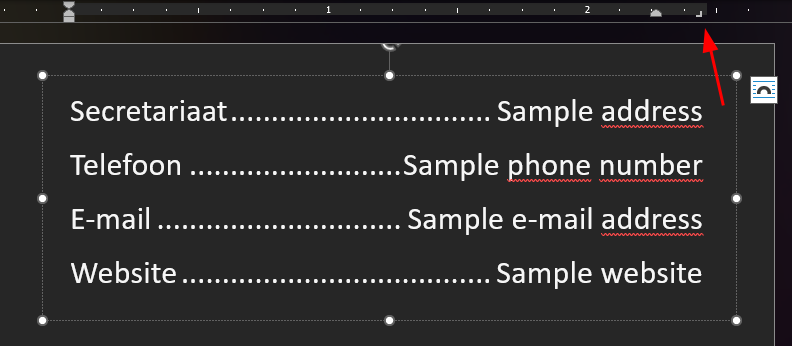
In Microsoft Word I used a right aligned tab stop and gave it the dotted line option. It then looks like this, which is somewhat what I am trying to reproduce here:
Hi, welcome to the forum!

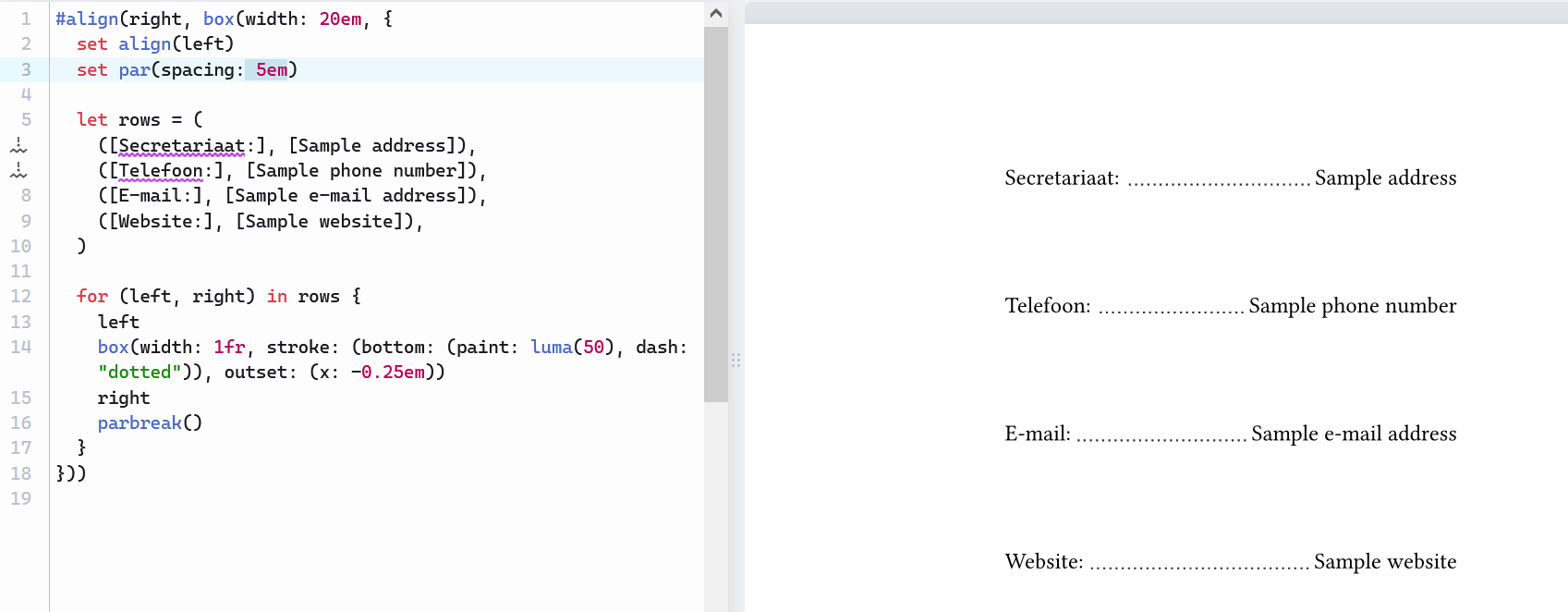
Check 1fr (one fraction of the remaining space):

#align(right, box(width: 20em, {
  set par(spacing: 0.65em)

  let rows = (
    ([Secretariaat:], [Sample address]),
    ([Telefoon:], [Sample phone number]),
    ([E-mail:], [Sample e-mail address]),
    ([Website:], [Sample website]),
  )

  for (left, right) in rows {
    left
    [ ]
    box(width: 1fr, stroke: (bottom: (paint: luma(50), dash: "dotted")))
    [ ]
    right
    parbreak()
  }
}))

(By the way, if you know any community platform specific to your language (Dutch, I guess?), I suggest you comment it under Community platforms)

Hello,

I feel quite a bit silly now haha, because I was so close. I had a brainfart that I wanted to use #h(1fr) and then put a line in it or something. I didn’t realize that the basic trick I just did to give the box a certain fixed size, I could also use that to give it a dynamic size.

I guess that I was a bit blind because I started with a grid. So, thanks for the adequate and also very fast response. This is very much appreciated!


And yes, I’m Dutch, but I’m not sure why you’re actually suggesting with the Compunity platforms?

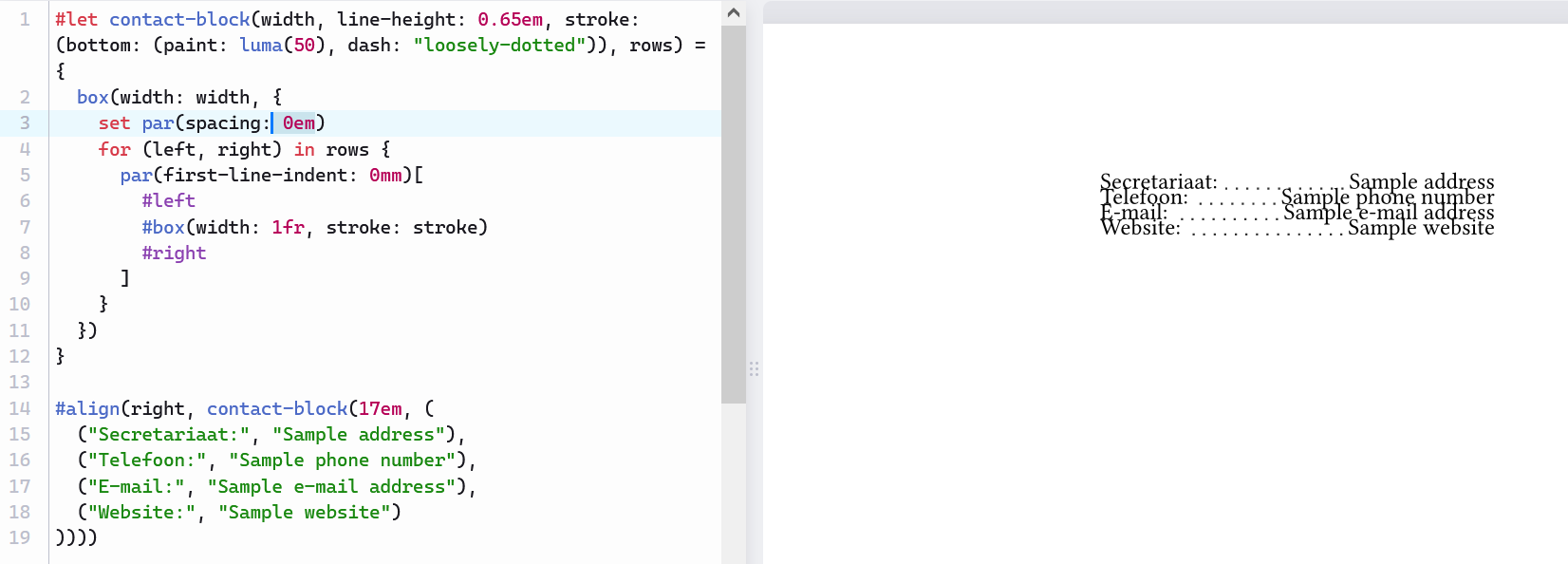
For full reference, after taking your hint, I went with this one in the end. Besides making it a reusable function, I also choose a few other things that I don’t fully understand why, but they work better it seems for me.

  1. The set par(...) didn’t seem to do anything. There was too much space between each line to my tastes.
  2. I tried linebreak() instead of parbreak(), and while that solved my initial problem, I figured a parbreak() is better here for some reason.
  3. That’s why I went with par(...) inside the box, so that I could actually style it with the spacing, as for some reason the set par(...) didn’t do anything…
  4. It’s still unclear to me where the extra horizontal space comes from between the three elements. It appears to be a par feature, but I can’t seem to be able to find with what I can turn this off. That means I’ve now simply settled for a 1 space spacing.
#let contact-block(width, line-height: 0.65em, stroke: (bottom: (paint: luma(50), dash: "loosely-dotted")), rows) = {
  box(width: width, {
    for (left, right) in rows {
      par(spacing: line-height, first-line-indent: 0mm)[
        #left
        #box(width: 1fr, stroke: stroke)
        #right
      ]
    }
  })
}

#align(right, contact-block(17em, (
  ("Secretariaat:", "Sample address"),
  ("Telefoon:", "Sample phone number"),
  ("E-mail:", "Sample e-mail address"),
  ("Website:", "Sample website")
))))


So maybe, and this is not tied to the original question I suppose, could you explain to me why

  1. The set par(...) in your example doesn’t seem to do anything? I guess because of that also the parbreak() added too much vertical whitespace.
  2. How I maybe could target the space between the three “values” and reduce it to 0? Because then I could add a #h(0.5em) or something like that in between for example.

Once again, my sincere thanks for putting me on the right track. This was teasing my mind so hard :grimacing:.

1 Like

Interesting… As shown below, it works with both my original example and your final example.


Perhaps it didn’t work because you had changed parbreak() to linebreak() when you were testing set par(…)?
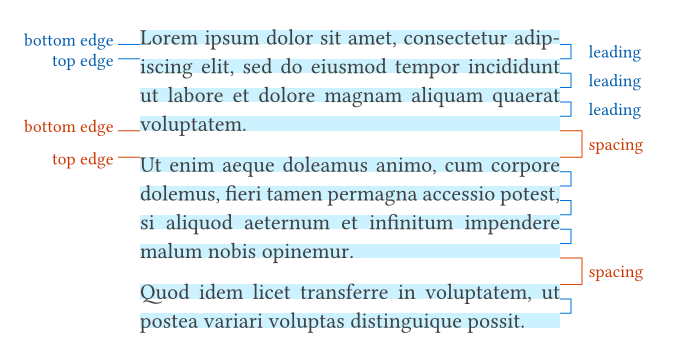
A paragraph may have multiple lines. Lines in the same paragraph are separated by par.leading, while the paragraphs as a whole are separated by par.spacing.
See the illustration in par.leading - Typst Documentation:

I also encountered this problem when I first used Typst.
The quirk is that Typst has three syntactical modes: markup, math, and code. Markup mode is the default in a Typst document, and it’s also the mode inside […]; code mode is the mode after # and inside {…}. In markup mode, spaces and newlines become spaces; but in code mode, they vanish.

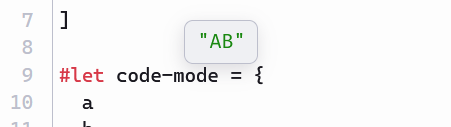
To see that, you can copy the following Typst document to your editor, and hover the variable markup-mode or code-mode. You’ll see that the value of markup-mode is a sequence of space, A, space, B, space, and that of code-mode is A and B concatenated without any space in between.

#let a = "A"
#let b = "B"

#let markup-mode = [
  #a
  #b
]

#let code-mode = {
  a
  b
}


In your case, try replacing par(…)[…] with par(…, {…}):

      par(spacing: line-height, first-line-indent: 0mm, {
        left
        box(width: 1fr, stroke: stroke)
        right
      })

(No particular reasons, just that it wasn’t noted before :-)